


Program 04 · Educational preview
Robotics, Physical AI & Autonomous Systems Engineering
Connect what a robot sees to what it does.
Engineers exploring robotics and simulated autonomy.
Current curriculum and admission prerequisites are not published in the verified program source. Confirm them with the team.

Free educational reading
Explore this program through articles.
0 published articles · Reading times are calculated from the content.
Coming soon. Explore the teaching examples and exercises below while full articles are prepared.
Browse and filter articles →Understand the work
One example, step by step.
- Sense the environment
- Estimate the robot state
- Plan a route
- Act and observe the result
A map is an estimate of the environment.
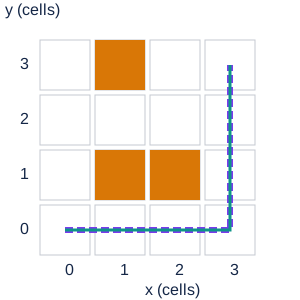
Prepared 4 × 4 grid. A breadth-first search finds a shortest route using four-direction moves. Coordinates are grid cells, not metres. A simulated robot stops if its next cell is occupied.
Known map: planned route and simulated trajectory reach (3,3) from (0,0). Violet dashes = plan; teal line = simulated trajectory.
This discrete simulation omits inertia, sensing uncertainty and stopping distance. It does not demonstrate real-world safety.
Teal · camera · Coral · arm · Blue / amber · matching objects and bins
The camera identifies the amber block beneath the gripper. The matching amber bin is its destination.
How it works
A simplified Cartesian tool slide on a jointed arm. The replay follows a fixed, collision-checked path; it is not live robot control.
The editable SVG demonstrates a sorting arm; the navigation scenario separately models a mobile robot. Both are simplified examples.
Article draft · Awaiting editorial publication
How a Robot Turns Sensor Information into Physical Action.
A small warehouse robot needs to reach a destination without entering an occupied cell. That sounds simple until its map omits a crate. The robot must connect observations to a state estimate, a route and physical action, then check what happened.
Each stage answers a different question
Perception asks what the sensors observe. Localization asks where the robot is relative to an environment representation. Planning chooses a route or action sequence under a model of that environment. Control turns that intention into actuator commands. New observations close the loop.
Robot Operating System 2, usually written ROS 2, provides software infrastructure commonly used in robotics. The Nav2 documentation repository describes a navigation framework with distinct planning, control and supporting components. Our small demonstration is a discrete browser simulation, not a ROS 2 implementation.
A map, a plan and a trajectory are different artifacts
The map records which grid cells the example believes are occupied. The violet dashed line is a planned route. The teal line records where the simulated robot actually travels. When all obstacles are known, the two paths coincide. Moving an obstacle recomputes a route with breadth-first search: the algorithm explores neighboring cells until it reaches the goal.
Try the incomplete-map scenario. An obstacle at (2,0) is present in the physical simulation but absent from the planner’s map. The robot stops before entering it. The remainder of the planned path still exists, yet the actual trajectory no longer reaches the goal.
The coordinates are cells, not metres. Four-direction movement costs one step per cell. The example assumes a point-sized robot, immediate stopping and exact positions. Real navigation must account for footprint, dynamics, uncertainty and appropriate safety engineering.
Exercise: test a route before improving it
Run the supplied standard-library Python navigation example on a CPU. It prints a shortest route through a four-by-four grid and a stopped trajectory when an obstacle is missing from the planning map. No physical robot or additional library is needed.
Change the blocked-cell list and confirm that every consecutive route point is one permitted move away. Then surround the destination and check that the planner returns no route. Record the obstacle map, planned coordinates, actual coordinates and failure condition for each scenario.
A useful extension adds a simulated sensor update after stopping and asks the planner to compute a new route. State that this models information becoming available; it does not establish the correctness of a real sensor.
Build a project around scenario evidence
Create a navigation simulation with clear map and trajectory displays, repeatable scenarios and documented failure cases. Explain when the robot has enough information to proceed and when it should stop.
Study coordinate systems, planning and simulation before integrating a real platform. The card introduces the field, and the project example is educational guidance rather than a verified admissions prerequisite or a safety claim.
Project example
Build evidence of your understanding.
A navigation simulation with trajectories and failure cases.
Keep the inputs, assumptions, source references, expected behavior, observed results and limitations together. This is an educational project suggestion, not a verified course deliverable.